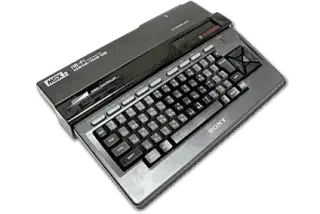
MSX2
MSX2 Emulatoren
3 Emulatoren verfügbar — wähle den richtigen für dein Gerät
Windows(3)
macOS(2)
Linux(3)
Android(2)
iOS(1)
openMSX
EmpfohlenOpen SourceopenMSX is an open-source MSX emulator that strives for perfection in terms of accuracy. It supports MSX, MSX2, MSX2+, MSX turbo R, and also includes ColecoVision emulation via its Coleco machine definition.
Unterstützte Plattformen
WindowsmacOSLinux
RetroArch
EmpfohlenOpen SourceRetroArch is an all-in-one frontend for emulators, game engines, and media players. It brings hundreds of emulator cores under one roof with a unified interface, shader support, and cross-platform availability.
Unterstützte Plattformen
WindowsmacOSLinuxAndroidiOS
fMSX
fMSX is a portable MSX/MSX2/MSX2+ emulator available on Android, Windows, and Linux. It is one of the oldest MSX emulators still actively maintained, with broad game compatibility.
Unterstützte Plattformen
WindowsLinuxAndroid
Wie man MSX2-ROMs spielt
- 1Einen Emulator herunterladen aus der obigen Liste — wähle einen, der zu deinem Betriebssystem passt.
- 2Eine ROM herunterladen für das Spiel, das du spielen möchtest, aus unserer Spielebibliothek.
- 3Die ROM öffnen im Emulator über Datei → Öffnen oder durch Ziehen der ROM-Datei ins Fenster.
- 4Steuerung konfigurieren in den Emulator-Einstellungen, um Tastatur oder Gamepad zuzuweisen, und das Spiel genießen!